Contract navigation
A document map of the whole contract, jump-to-citation buttons on every extracted field, and a PDF that scrolls to your work as you move. Never lose your place.
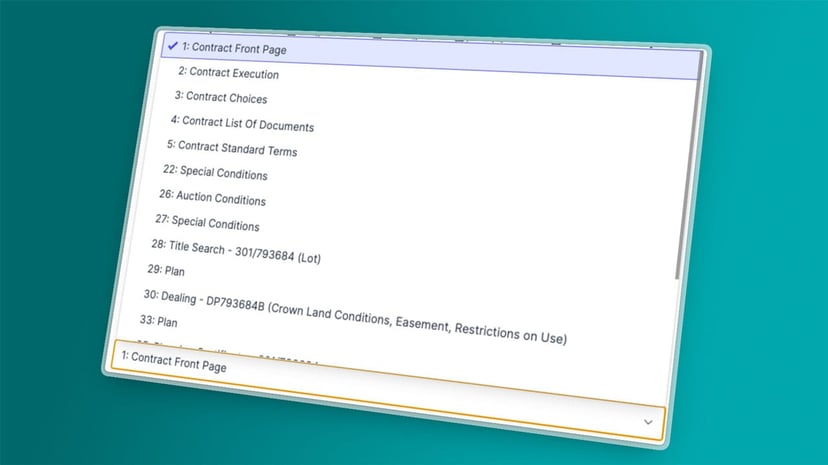
A property contract is too long to scroll through every time you need to check where a value came from. Curia Contract Review gives you a document map of the whole contract, and every extracted field carries a jump-to-citation button back to its source. You move through the file with clicks, not endless scrolling.
The problem with hunting through a PDF
A typical NSW or VIC property contract is 60 to 200+ pages, and at any point in your review you might need to verify a single value: which checkbox is ticked on the front page, what clause this dealing came from, what special condition 14 actually says. The default workflow is hunt-and-scroll: open the PDF, find the right page, lose your place, come back. Multiply that by every value you check and the time adds up.
How navigation works in Curia
A document map of the whole contract
Curia builds a navigable map of the contract from its first read: every section labelled, every instance indexed, every dealing tagged with its number and category. Click any entry and you're there.
Jump-to-citation on every extracted field
Every extracted field has a citation back to the page and clause it came from. Click any field and the PDF jumps to that source. Click the deposit value, the PDF lands on the front page. Click special condition 14, you're at the right clause. The check-the-source step that used to mean hunting is now one click.
Find purchased lots on the plan
Locating a purchased lot on the plan can mean scrolling through dozens of pages, especially on unregistered land and large modern developments. Curia does the looking for you, so you can jump straight to the right page and the minutes spent hunting for area and dimensions disappear.
Automatic PDF scrolling
As you move through the review, the PDF beside you keeps pace. Open a section, the PDF scrolls to the relevant page. Open a special condition, the PDF lands on the right clause. Your eyes don't leave your work to find the source.
Tuned to Australian conveyancing
Whether the file is a NSW standard contract or a Victorian contract with its Section 32 statement , the navigation reflects the document structure as it actually is. NSW prescribed sections, VIC firm-specific layouts, the Section 32 as its own indexed document. Same navigation, file-specific shape.
Where it sits in the review
Navigation runs throughout your review, not just at upload. Every extracted field is anchored to its source, every section is one click away, and the PDF beside you keeps pace as you work. It's the connective tissue between data extraction and the rest of the workflow.
See Curia in action
See Curia handle a real contract. Book a demo .