Visual Reference
Pull a page out of the contract PDF, mark it up with arrows, highlights and notes, and drop it straight into the purchaser's report. Hard clauses, explained visually.
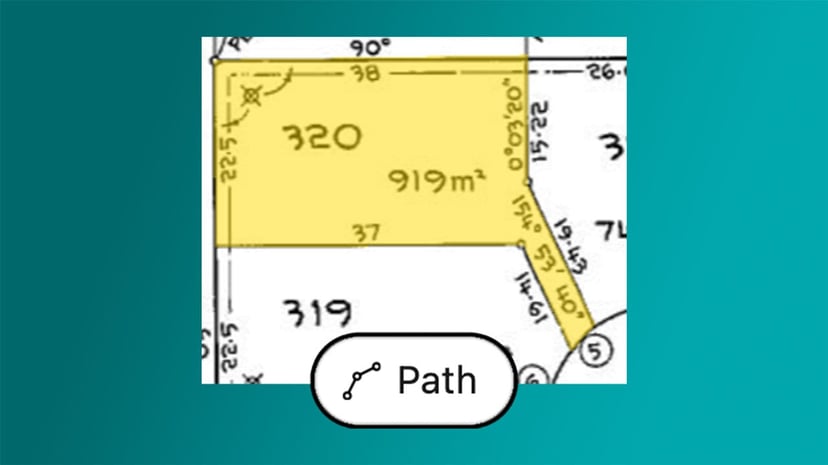
A purchaser doesn't read a contract the way you do. The clause that matters is buried on page 47, the easement is a thin line on a deposited plan, the strikethrough sits halfway down the special conditions. You can see it. Explaining it in words is slow, and most purchasers won't follow it.
The problem with text-only explanations
You've found the issue and now you have to communicate it. So you screenshot the PDF in a snip tool, paste it into Word, crop it, label it by hand, then write three paragraphs around it to make sure the purchaser actually notices. Maybe you even print, draw and scan the image. It works, just badly, and you stop using images where they are most useful because of the pain involved in creating them.
How Visual Reference works
Pull any page out of the contract
Open the contract in Curia Contract Review and grab a page as a full-resolution image. A special conditions page, a Section 32 disclosure, a title diagram, a planning certificate, whatever the purchaser needs to see. No external PDF tool, no screenshot stitching, no scanning and no quality loss.
Mark it up where it matters
Add an arrow to the clause that shifts the deposit trigger. Crop the clause that creates a restriction of use. Highlight the easement for services on the title diagram. Simple tools allow you to capture, crop, highlight and draw anything you can imagine, whenever you need it, in seconds.
Embed it inline with your advice
Your annotated image is placed next to the review item it relates to, a special condition, a dealing, a planning matter. When Curia generates the final report, the visual carries through with your plain-English explanation beside it. The purchaser reads your advice and sees the actual image from their own contract at the same time.
Tuned to Australian conveyancing
Every Australian property contract has pages that are easier to show than to describe. NSW contracts carry complex dealings and restrictions spanning several pages. Victorian contracts and Section 32 statements bundle disclosure pages, planning certificates and owners corporation material that purchasers find dense on the page. Visual Reference works against the contract you've uploaded, so the process is fast and part of your standard workflow.
Where it sits in the review
Visual Reference is on the output side of the workflow. As you step through the review, you annotate the pages where a visual will land faster than prose, and the final purchaser report displays them inline. The document the purchaser receives reads less like a legal memo and more like a guided walk through their own contract.
See Curia in action
See Curia handle a real contract, page by page. Book a demo .