Report Versions
Every report you download is captured as a fixed version, so you have a dated record of exactly what each client received. Re-download or view any version later, unchanged by anything edited since.
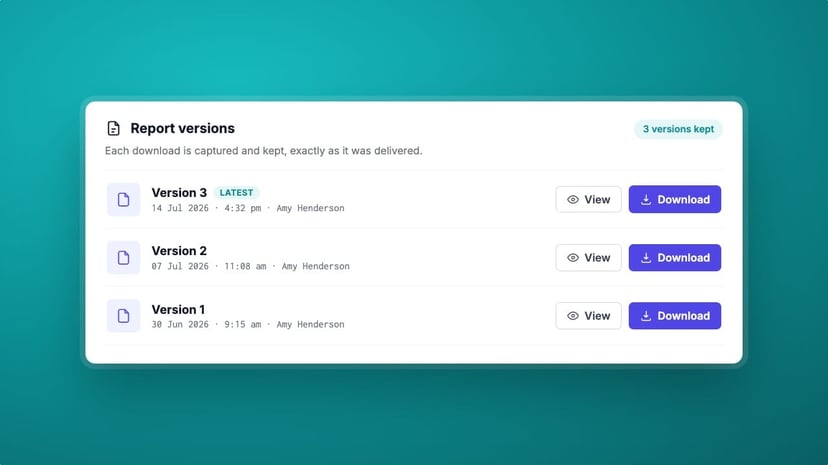
The report you send is the record of your advice. Months later a client asks for the copy you sent, or a question comes up about what was disclosed at the time. If your tool only ever shows the latest version, you are left reconstructing what the file looked like when it mattered. Report Versions removes the guesswork: every report you download is captured and kept, exactly as it was delivered.
Why a living document isn't enough
A contract review file keeps moving. You reopen a matter, a special condition changes, an amendment is added, the report regenerates. That is exactly what you want while the work is live. It is not what you want when you need to show what a client actually received. Without a fixed record, "which version did they get?" has no reliable answer.
How Report Versions work
A version is captured when it matters
Each time you download a report, Curia captures that exact copy as a numbered version, stamped with the date, the time and who downloaded it. Reopen the review, change it and download again, and the new report is captured alongside the old one, so the history reflects real deliverables.
Re-download the exact deliverable
Every version keeps its own download button. Pull down Version 1 and you get the report precisely as it was sent, untouched by anything edited since. When a client asks for the copy from three months ago, you send the copy from three months ago, not today's regenerated version.
View any version read-only
Open any version in Curia to read it in place, without downloading. It opens read-only, so you can check what a past report said while the current file stays exactly as it is.
Where it sits in the review
Report Versions sit at the end of the workflow, on the Finalise tab. After you have stepped through the file, finalised the Amendment List and generated your branded report , the download is captured as a version. It works the same way on NSW contracts and Victorian Section 32 statements : every report you deliver is kept, whatever the state.
See Curia in action
Book a demo and we'll show you how Curia captures and keeps every report you send.